
Daily Vlog export guide
How to Save Setlog Video on iPhone and Android
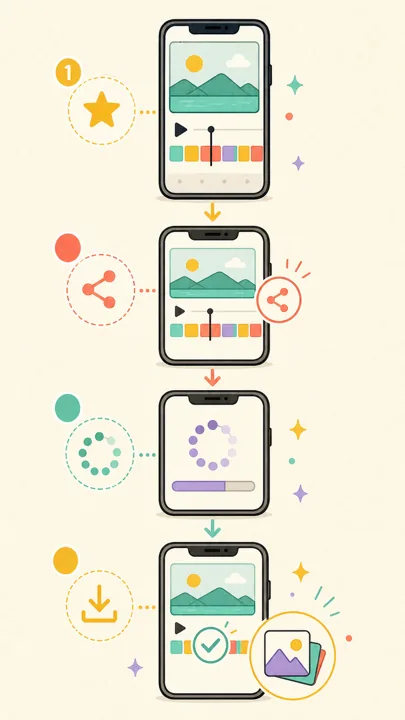
To save a Setlog video, open the completed daily Vlog, tap the share icon in the upper-right corner, wait while Setlog generates the video, and choose Save Video. Verify the result in Photos on iPhone or the Setlog folder in Google Photos or Gallery on Android.
Quick answer
The Setlog video save path has four stages
Open
Open the completed daily Vlog.
Share
Tap the top-right share icon.
Generate
Keep Setlog open while it renders.
Save
Save Video, then check the file.
Know which Setlog video you are saving
Setlog records short moments during the day and combines them into a continuous daily Vlog. The main save and export flow applies to that completed daily Vlog. An individual recording preview is a different screen and may not show the same share control. This distinction matters because many missing-button problems begin when the user is still on the camera or clip preview screen.
Before exporting, open the correct Log, confirm the date, and play the daily Vlog. If you can watch the complete sequence, you are at the right starting point. If you only see a camera prompt or one unfinished clip, return to the Log and open the compiled Vlog instead.
Current day
How to save Setlog video step by step
Open the Log that contains the day you want
Start on the Setlog home screen and open your own Log or a shared Log you can access. Tap the Vlog for the correct day so it opens as a continuous daily video. Do not start from the camera screen or an individual recording preview.
Tap the share control in the top-right corner
On the daily Vlog screen, use the share icon in the upper-right corner. It is normally shown as a square with an upward arrow. This control starts the daily video export; it is not the button used to record another two-second clip.
Wait while Setlog generates the daily video
Setlog has to join the day's short clips into one file. Keep the app open while the generation message or progress screen is visible. Leaving the app, locking the phone, or switching networks during this stage can interrupt the export.
Review the generated Vlog
When generation finishes, play a few seconds of the preview. Check that the date is correct, the video is not black, and the expected clips are present. If the preview is already wrong, repeating Save will only create another incorrect copy.
Choose Save Video or the local save action
Tap Save, Save Video, or Share and then Save Video, depending on the version and phone. Approve Photos or media access if the system asks. Wait for the completion message or check mark before closing the screen.
Open the saved file outside Setlog
Confirm the result immediately. On iPhone, check Photos. On Android, check Google Photos or Gallery and look for a Setlog folder. Play the exported file with sound before deleting clips, clearing app data, or sharing it elsewhere.
Save Setlog video on iPhone
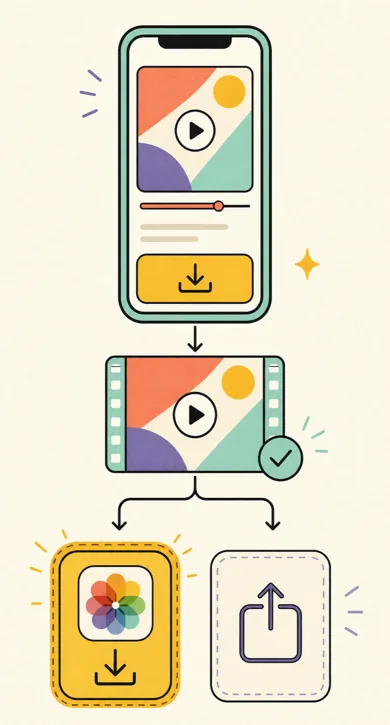
Allow Setlog to add videos to Photos when iOS asks. After saving, open Photos and check Recents and Videos. If the export does not appear, open iPhone Settings, locate Setlog, and review Photos permission. Limited access can stop the app from writing the generated Vlog even when playback inside Setlog works.
If you choose a messaging or social app from the share sheet, the file may be sent there without being added to Photos. Use Save Video when you want a local copy that remains available outside the receiving app.
Save Setlog video on Android
Approve Photos and videos or media permission, then complete the Setlog save video flow. Open Google Photos or Gallery and check the Videos collection and the Setlog folder. Folder names and Gallery layouts vary by phone maker, so use the most recent file view if the Setlog album is not immediately visible.
If generation succeeds but the exported video is black, replay the preview and retry with Setlog kept in the foreground. Some Android users report that changing export quality from Standard to Fast resolves black exports on affected versions. Verify the replacement file before deleting the first copy.
How to save an older Setlog Vlog
Open the Log that originally contained the video. Use the control beside the Log name to open its menu, choose Archive, and use the calendar to select the date you need. Open that day's Vlog, tap the upper-right share icon, wait for generation, and save the completed video exactly as you would for the current day.
Export one date and verify it before moving to the next. The practical Setlog download video process works one daily Vlog at a time; selecting several dates does not create one bulk archive. Use a consistent filename or album after each export if you are preserving many days.
Fix Setlog video export problems in order
Start with the screen and generated preview before changing phone settings. That prevents unnecessary reinstalls and helps identify whether the failure occurs before rendering, during generation, or while writing the final file to the phone.
The share or save button is missing
Confirm that you opened the completed daily Vlog, not the capture screen, a thumbnail, or an individual clip preview. Return to the Log, open the day again, and check the upper-right corner.
Generation stays on the progress screen
Keep Setlog in the foreground, change from an unstable mobile connection to Wi-Fi, and try again. If it still stalls, close and reopen Setlog before starting a new export. Do not clear app data as the first fix.
The exported video is black
First replay the preview inside Setlog. Android users have also reported that changing export quality from Standard to Fast can resolve a black export on some versions. Treat this as a version-specific workaround, then verify the new file.
Setlog says saved, but the file is missing
Check Photos, Recents, Videos, Google Photos, Gallery, and the Setlog album or folder. If you used Share instead of Save, also check the app selected in the share sheet.
Saving fails immediately
Review Photos and video permission for Setlog, then check free device storage. A generated daily Vlog needs enough temporary space to render and enough final space to write the completed file.
An older date cannot be found
Open the Log menu, choose Archive, and select the date from the calendar. Also confirm that you are signed into the same account and opened the same Log where the clips were originally posted.
Verify the export before cleanup
A successful message is not the final check. Open the saved Setlog video outside the app, scrub through the beginning, middle, and end, and confirm that picture and sound work. Only then should you clear app data, reinstall Setlog, remove a Log, or delete source clips. Clearing cache and clearing app data are different operations, and app-data removal should never be the first response to an export problem.
Check Setlog storage safelySetlog save video FAQ
How do I save a Setlog video?
Open the completed daily Vlog, tap the share icon in the upper-right corner, wait for Setlog to generate the video, and then choose Save Video or the available local save action. Confirm the file in Photos on iPhone or Google Photos / Gallery on Android.
How do I export a Setlog video from an older date?
Open the relevant Log, use the menu beside the Log name, choose Archive, select the date from the calendar, open that day's Vlog, and use the same share and save process. Interface labels can vary slightly by app version.
Where does Setlog save video on Android?
Check Google Photos or your Gallery app. On many Android devices, exported videos appear in a folder or album named Setlog. Also check the Videos collection and the destination selected in the Android share sheet.
Why is my exported Setlog video black?
Replay the generated preview first. If the preview works but the saved file is black, retry with Setlog kept in the foreground. On some Android versions, users report that changing export quality from Standard to Fast fixes the black video export.
Can I download every Setlog Vlog at once?
The practical export flow works one daily Vlog at a time. Select a date, generate that day's video, save it, verify the file, and then repeat for the next date. Do not clear Setlog data until every important export has been checked.
Can SetlogHub download a private Setlog video for me?
No. SetlogHub explains the in-app export process and does not host a downloader or bypass private Log access. Save only videos you can legitimately open, and get permission before reposting a shared Vlog.